See what every
coding agent
is doing
Terminal UI, macOS and Linux desktop app, and HTTP API to monitor all running Claude Code (CLI & Desktop), Cursor, Codex, Grok CLI, Kilo, Kimi Code CLI, Amp, pi, and OpenCode instances. Track activity, tokens, and cost in real-time.
brew install --cask illegalstudio/tap/lazyagent 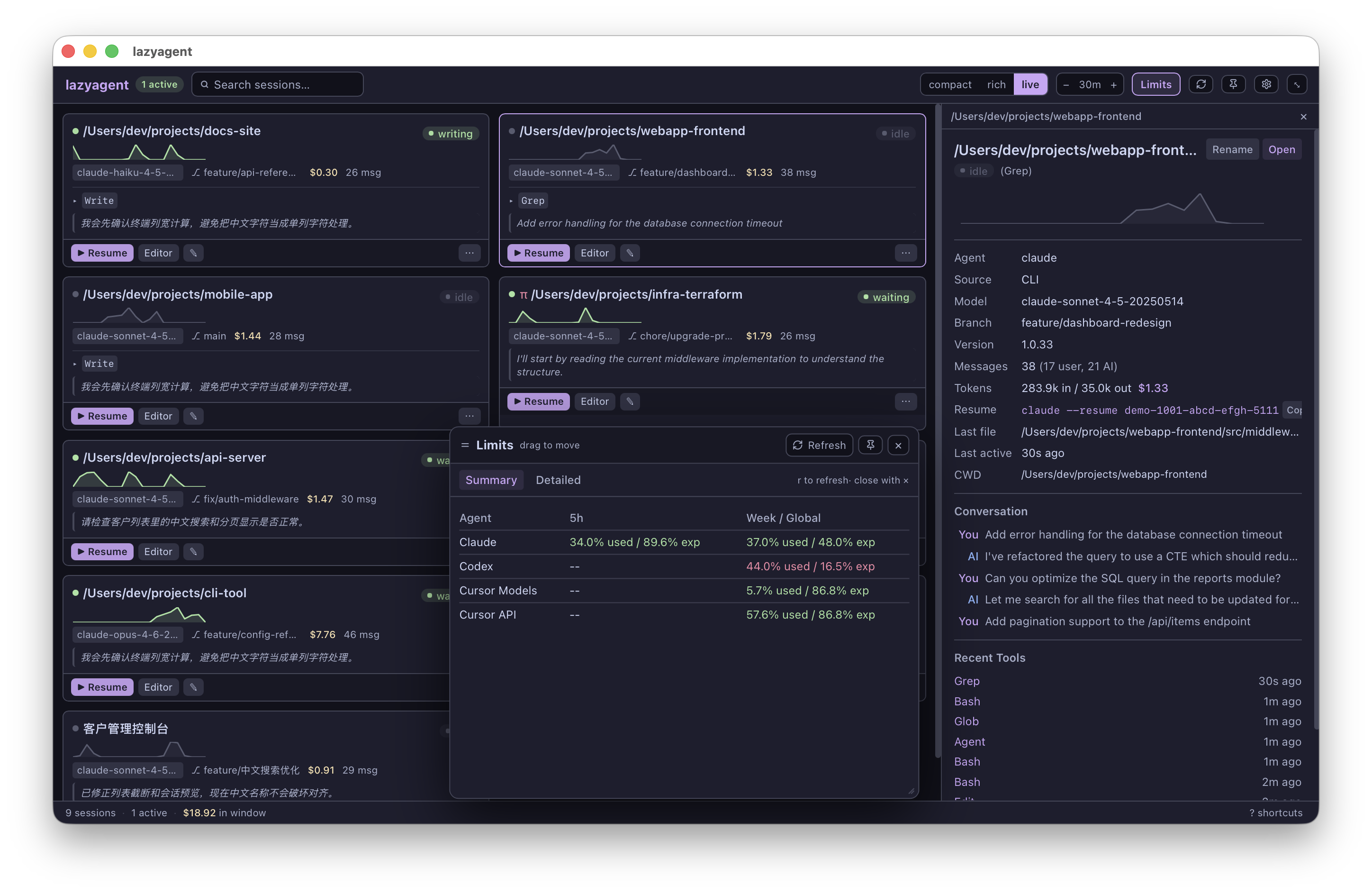
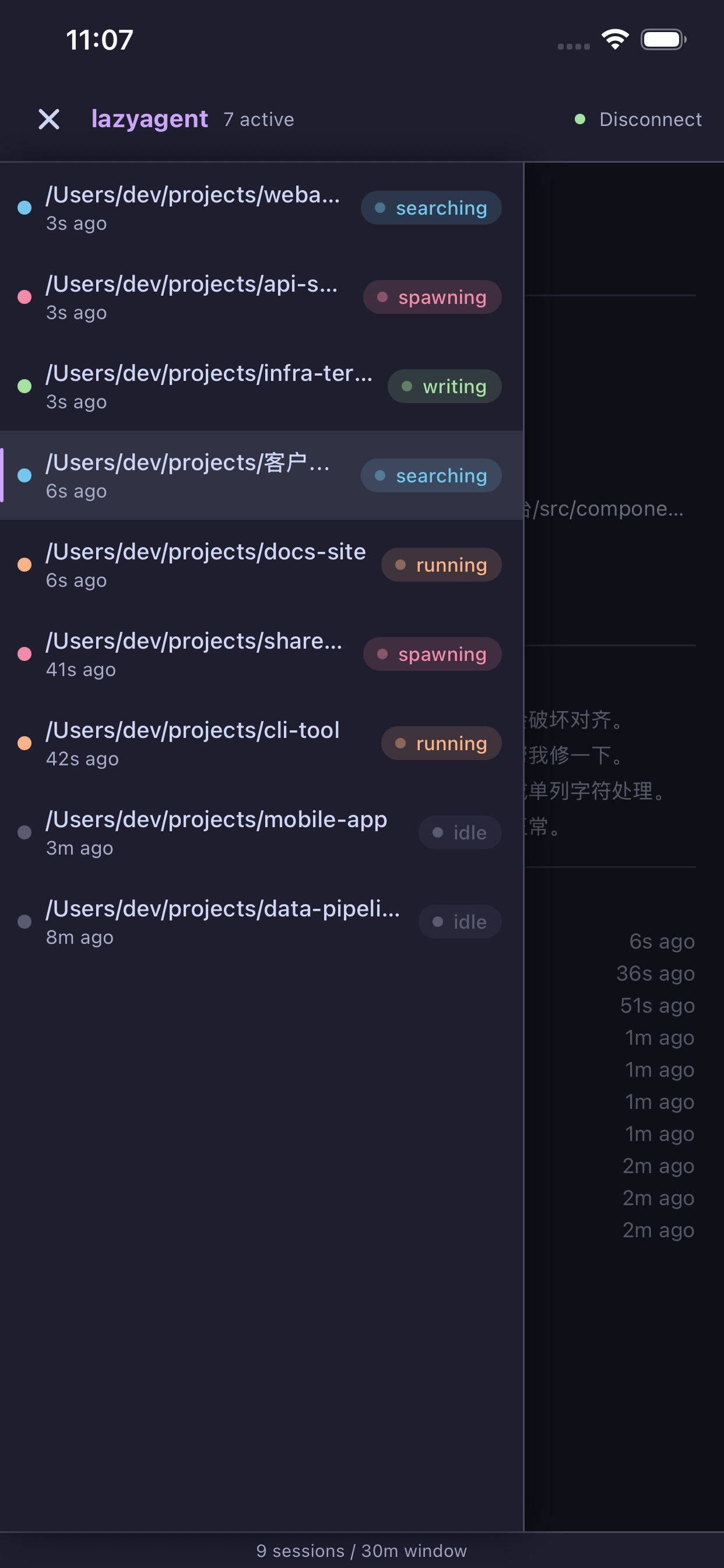
Your agents,
in your pocket
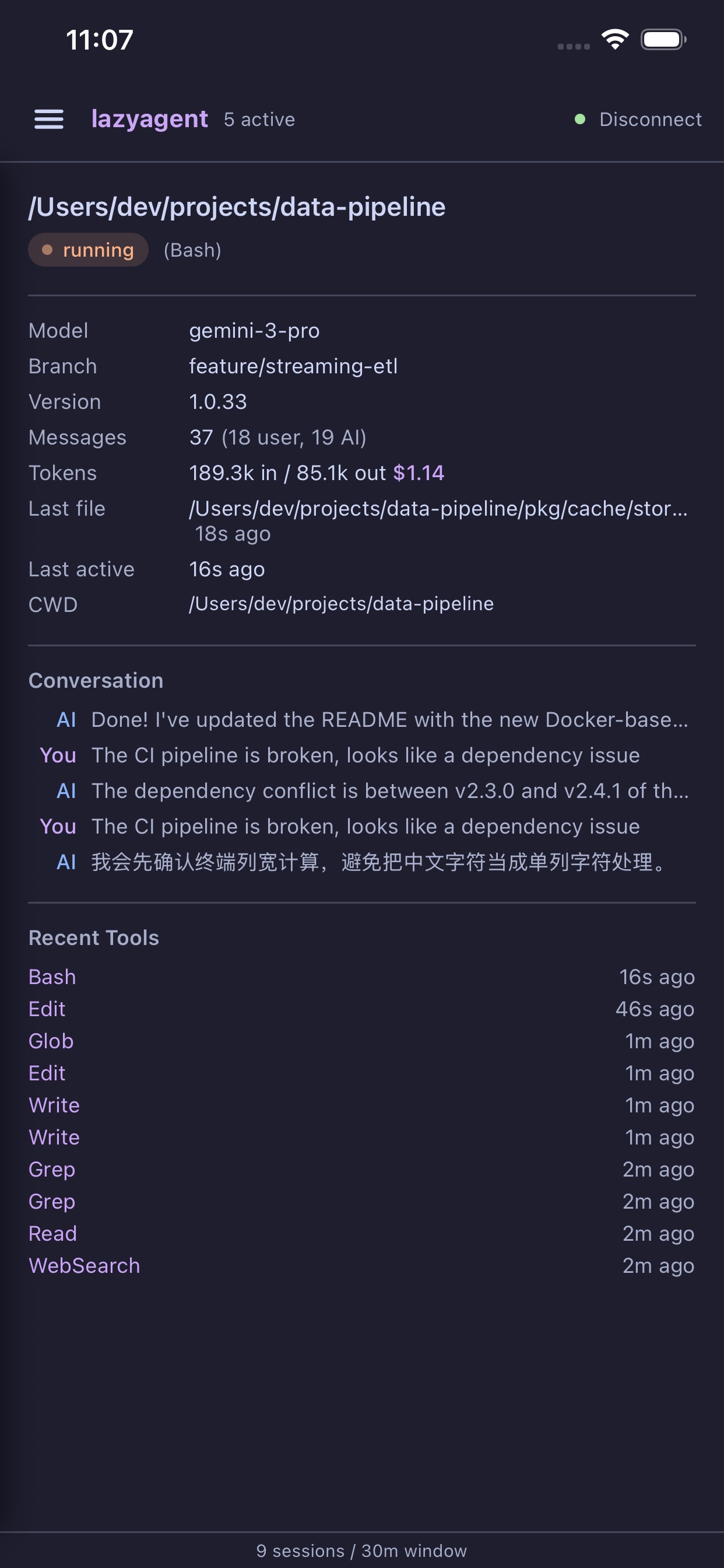
Monitor every coding agent session from anywhere. Connect to your lazyagent instance via the HTTP API and keep tabs on activity, tokens, and cost — right from your iPhone.
- Real-time session list with live status
- Full conversation history & tool usage
- Token count and cost tracking per session
- Secure passphrase-based connection
Capabilities
Everything happens
in one place
Real-time monitoring
Live activity states for every session: thinking, writing, reading, searching, compacting.
Multi-agent support
Monitors Claude Code (CLI & Desktop), Cursor, Codex, Grok CLI, Kilo, Kimi Code CLI, Amp, pi, and OpenCode side-by-side. Use --agent to filter.
Cost tracking
Automatic token counting and USD cost estimation per session.
Activity sparklines
Visual intensity graphs to spot which sessions are most active over time.
Maintenance built-in
sessions, history, and latest find and resume work for the current directory. prune, compact, search, and limits manage transcript data and usage from the CLI.
Transcript search
search finds any message across Claude, Codex, pi, Amp, Grok, and Kimi transcripts with highlighted snippets and an incremental local index. Cursor, OpenCode, and Kilo are excluded because they keep history inside third-party SQLite databases. Pick a result to resume the chat in its original agent.
Rate-limit visibility
limits prints rate-limit and billing windows for Claude Code, Codex, Grok, Kimi Code CLI, and Cursor. Grok supports weekly unified-billing credits and legacy monthly plans, while Cursor shows its Models and API pools separately. --detailed adds bars, reset times, and pace. The same summary is available in the TUI and desktop app, on demand with no polling.
API authentication
Passphrase-based Bearer tokens (PBKDF2-SHA256) protect the HTTP API. Derive the same token on any client, including browsers, mobile apps, and curl.
Outbound webhooks
Push signed HTTP POSTs to Slack, dashboards, or CI endpoints whenever a session changes state. Optional HMAC-SHA256 signing, event and agent filters, and automatic retries on transient failures.
Zero modifications
Reads existing session data (JSONL and SQLite) from each agent. Purely observational, and never touches agent files.
Fast & lightweight
Efficient filesystem watching and incremental discovery caches. The standalone CLI is a single Go binary with no runtime dependencies.
Three interfaces
TUI, macOS and Linux desktop app, or HTTP API. Same core, mix and match as needed.
Interfaces
One binary,
three ways in
Desktop App
macOS + Linux · lazyagent --gui A native desktop app for the macOS menu bar and Linux system tray. Click the icon to toggle the session panel, or detach it for a full card-grid dashboard with compact, rich, and live densities. Resume sessions in your configured terminal, open projects in your editor, manage agents and API authentication in Settings, and inspect limits in a draggable dialog without blocking the dashboard.
Terminal UI
lazyagent
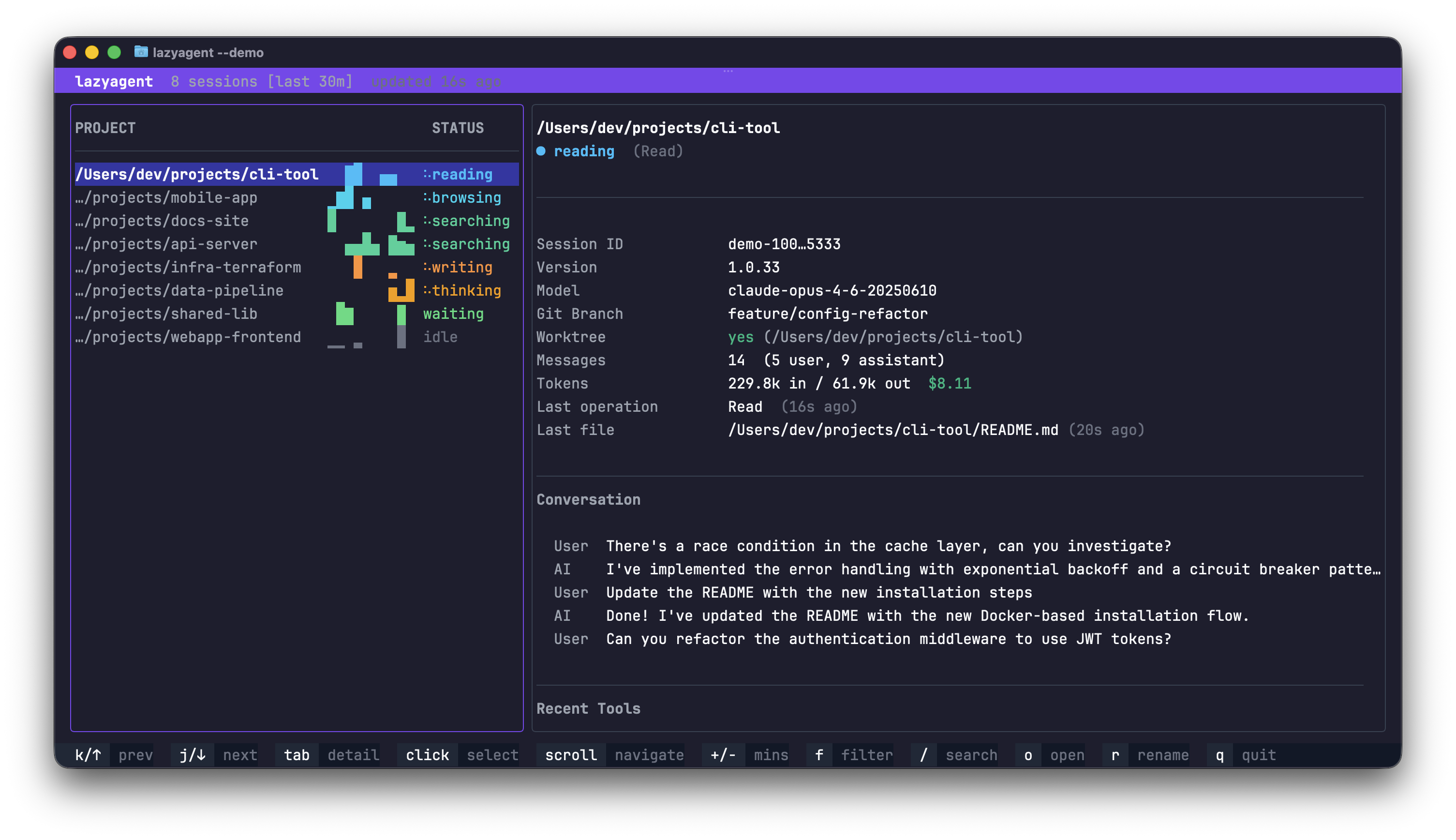
Full-featured TUI built with bubbletea. Vim-style navigation, fuzzy search, activity filters, time window controls, efficient real-time filesystem watching, and robust CJK/Unicode text rendering for Chinese and international project names and messages. The theme follows your terminal automatically: auto detects the background color, with dark and light overrides.
HTTP API
lazyagent --api REST endpoints + Server-Sent Events for real-time streaming. Bearer-token protected with passphrase-derived PBKDF2-SHA256 tokens. Build dashboards, mobile apps, or custom integrations on top.
Mix them: lazyagent --tui --gui --api Install
One command,
zero config
macOS, universal binary. Installs Lazyagent.app with the TUI, GUI, and HTTP API, then links the lazyagent command into Homebrew's bin.
Native DEB, RPM, and Arch packages include the system-tray app, desktop launcher, TUI, HTTP API, and CLI command. A portable AppImage is also available from each release.
macOS and Linux. Same lazyagent command with TUI and HTTP API, no GUI. It conflicts with the cask because the app already bundles the CLI.
API
Build on top
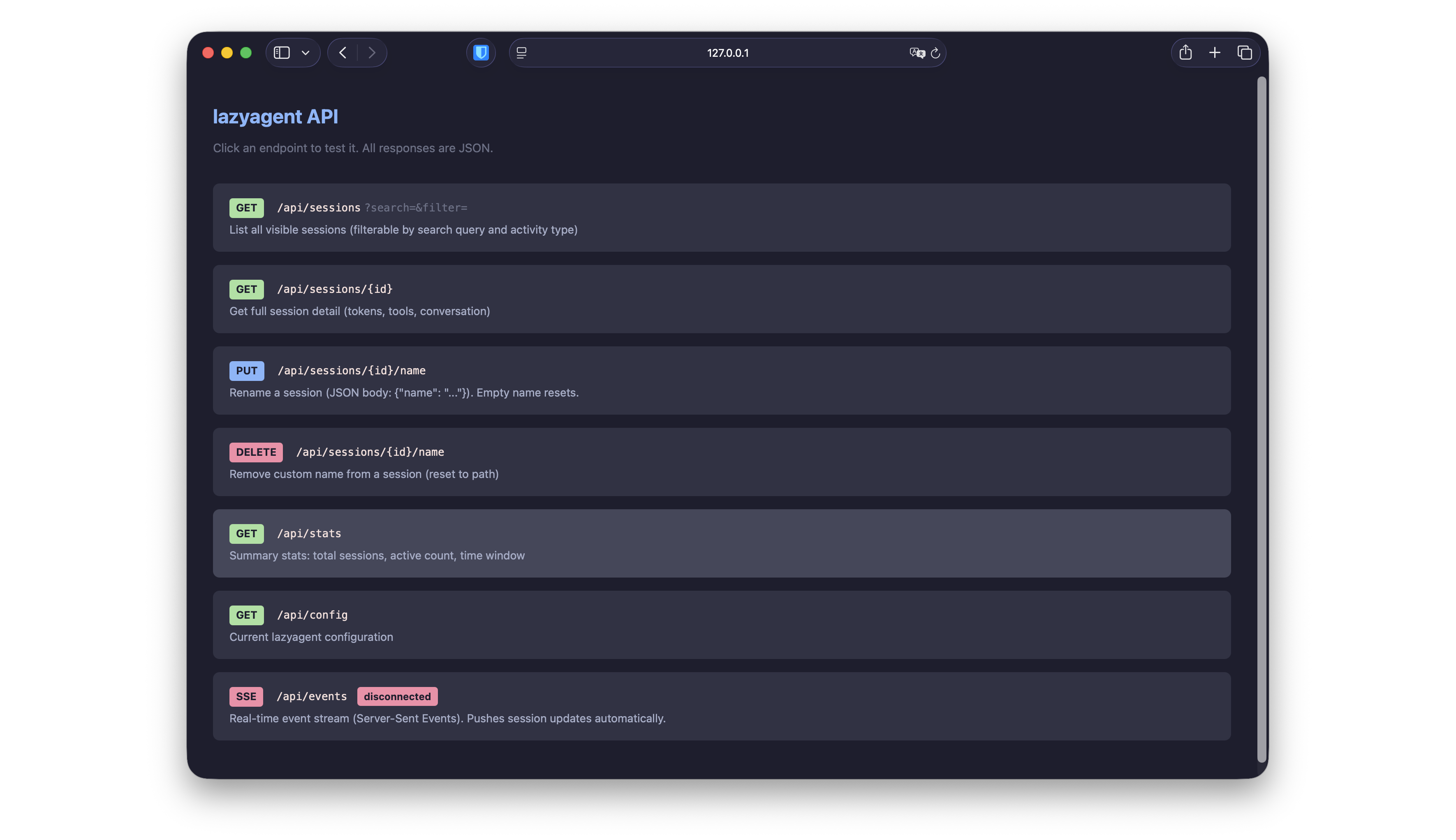
REST API with Server-Sent Events for real-time push updates. All data endpoints require a Bearer token derived from your passphrase via PBKDF2-SHA256. Build custom dashboards, mobile apps, or integrate with your existing tools.
127.0.0.1:7421 /api/sessions /api/sessions/{id} /api/stats /api/config /api/events