lazyagent --apiStarts an HTTP API on http://127.0.0.1:7421. If the port is busy the server tries up to 10 sequential ports (7421–7431) and binds to the first available one; the actual address is printed to stderr on startup. Pass --host to pin a custom address and disable the fallback.
Authentication
All data endpoints under /api/* require a Bearer token. The token is derived from a passphrase with PBKDF2-SHA256 plus a public per-install salt. GET /api and GET /api/auth are public so browsers and clients can load the playground and fetch the KDF parameters before deriving the token locally.
First run
lazyagent --apiIf no passphrase is configured, lazyagent prompts for one (twice, for confirmation), requires at least 12 characters, saves it to ~/.config/lazyagent/config.json under api_passphrase, and prints the derived bearer token to stderr once for the interactive setup:
API authentication enabled.
Bearer token: zqh9_r0QeYpLiLSQGZMYriIWqNZgZOu3Qc_l7wtraV4
Use header:   Authorization: Bearer <token>
On later startups the token is not printed to avoid leaking it into service logs. Use lazyagent passphrase --show when you explicitly need the raw token.
Non-interactive setup
If --api runs without a TTY (e.g. from launchd, a service, CI), set the passphrase via env var instead:
LAZYAGENT_API_PASSPHRASE='your-passphrase' lazyagent --apiThe env var takes precedence over the config file value and is never written to disk.
Rotating the passphrase
lazyagent passphrase             # prompt for a new one and save it
lazyagent passphrase --show      # print the current bearer token without prompting
The passphrase subcommand is independent of the server — change credentials any time. Any running lazyagent --api keeps the old token until you restart it.
Token derivation algorithm
salt        = value from GET /api/auth, also stored as api_salt in config
iterations  = 600_000
hash        = SHA-256
key length  = 32 bytes
encoding    = base64url, no padding  → 43-char token
Test vector — every client implementation must produce this exact value for the sample salt:
| Passphrase | Salt | Bearer token |
|---|---|---|
pippo | lazyagent-api-v1 | zqh9_r0QeYpLiLSQGZMYriIWqNZgZOu3Qc_l7wtraV4 |
JavaScript (browser, Web Crypto)
async function getAuthInfo(baseURL = "") {
  const res = await fetch(`${baseURL}/api/auth`);
  return await res.json();
}

async function deriveToken(passphrase, salt) {
  const enc = new TextEncoder();
  const baseKey = await crypto.subtle.importKey(
    "raw", enc.encode(passphrase.trim()), { name: "PBKDF2" }, false, ["deriveBits"]
  );
  const bits = await crypto.subtle.deriveBits(
    { name: "PBKDF2", hash: "SHA-256",
      salt: enc.encode(salt), iterations: 600_000 },
    baseKey, 32 * 8
  );
  const bytes = new Uint8Array(bits);
  let s = ""; for (const b of bytes) s += String.fromCharCode(b);
  return btoa(s).replace(/\+/g, "-").replace(/\//g, "_").replace(/=+$/, "");
}
Swift (iOS, CommonCrypto)
import CommonCrypto

func deriveToken(_ passphrase: String, salt: String) -> String {
    let pp = passphrase.trimmingCharacters(in: .whitespaces)
    let saltBytes = Array(salt.utf8)
    var key = [UInt8](repeating: 0, count: 32)
    _ = pp.withCString { ppPtr in
        CCKeyDerivationPBKDF(
            CCPBKDFAlgorithm(kCCPBKDF2),
            ppPtr, strlen(ppPtr),
            saltBytes, saltBytes.count,
            CCPseudoRandomAlgorithm(kCCPRFHmacAlgSHA256),
            600_000, &key, 32)
    }
    return Data(key).base64EncodedString()
        .replacingOccurrences(of: "+", with: "-")
        .replacingOccurrences(of: "/", with: "_")
        .replacingOccurrences(of: "=", with: "")
}
Kotlin (Android, javax.crypto)
import javax.crypto.SecretKeyFactory
import javax.crypto.spec.PBEKeySpec
import android.util.Base64

fun deriveToken(passphrase: String, salt: String): String {
    val spec = PBEKeySpec(
        passphrase.trim().toCharArray(),
        salt.toByteArray(Charsets.UTF_8),
        600_000, 32 * 8)
    val key = SecretKeyFactory.getInstance("PBKDF2WithHmacSHA256")
        .generateSecret(spec).encoded
    return Base64.encodeToString(key, Base64.URL_SAFE or Base64.NO_PADDING or Base64.NO_WRAP)
}
curl / shell
PASSPHRASE='your-configured-passphrase'
SALT=$(curl -s http://127.0.0.1:7421/api/auth | python3 -c '
import json, sys
print(json.load(sys.stdin)["salt"])')
TOKEN=$(PASSPHRASE="$PASSPHRASE" SALT="$SALT" python3 - <<'PY'
import os, hashlib, base64
salt = os.environ["SALT"].encode()
pp = os.environ["PASSPHRASE"].strip().encode()
key = hashlib.pbkdf2_hmac("sha256", pp, salt, 600_000, dklen=32)
print(base64.urlsafe_b64encode(key).rstrip(b"=").decode())
PY
)

curl -H "Authorization: Bearer $TOKEN" http://127.0.0.1:7421/api/sessions
Sending the token
| Use case | How |
|---|---|
| Regular fetch / curl | Authorization: Bearer <token> header |
Browser EventSource (SSE) | ?token=<token> query string (header not supported) |
The query-string fallback is only accepted on /api/events for SSE clients that cannot set custom headers. Use the Authorization header everywhere else; query strings appear in server logs and shell history.
Interactive playground
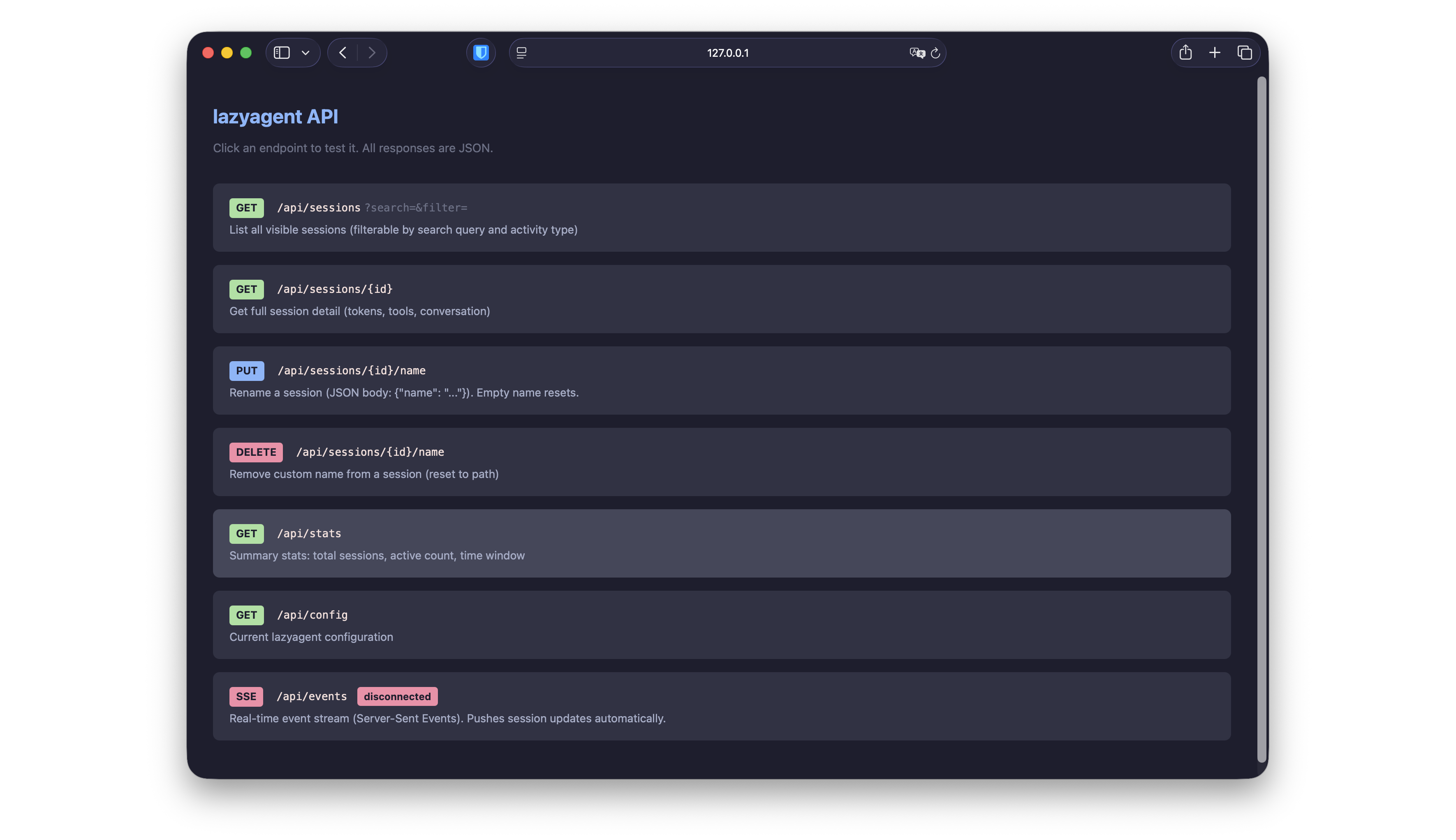
Open http://127.0.0.1:7421/api in a browser for the interactive playground. The page prompts for your passphrase, derives the token in-browser using the same PBKDF2 algorithm, and uses it for every subsequent call. Your passphrase never leaves the page; only the derived token is sent to the server.
The playground HTML page itself is unauthenticated so the browser can load it; all data endpoints behind it require the token.
Data freshness
Three mechanisms keep the API current:
- File system watcher — detects JSONL changes with a 200 ms debounce.
- Activity ticker (1 s) — re-evaluates activity states (idle/thinking/waiting transitions).
- Safety reload (30 s) — full rescan as a fallback in case a file event was missed.
SSE clients receive pushes from all three. REST clients see the latest state on each request.
At startup, the API completes its initial discovery before it begins serving requests, so the first REST response and SSE snapshot are complete rather than progressively populated. It still reuses lazyagent’s persistent discovery cache to keep that initial scan fast. The cache may contain session metadata and short transcript snippets; see Persistent discovery cache for location, permissions, and cleanup behavior.
Network access
By default the server binds to 127.0.0.1 (localhost only). To expose it on the network — e.g. for a mobile companion app on the same Wi-Fi:
lazyagent --api --host 0.0.0.0:7421The Bearer-token requirement applies regardless of bind address, but the API is plain HTTP — anyone on the network can read your traffic. For internet-facing exposure put the server behind an HTTPS reverse proxy (nginx, Caddy, Cloudflare Tunnel).
Endpoints
GET /api/sessions
List all visible sessions within the configured time window.
Query parameters (all optional):
| Parameter | Type | Description |
|---|---|---|
search | string | Filter by project path (case-insensitive substring match) |
filter | string | Filter by activity kind (e.g. thinking, writing, idle) |
dir | string | Filter to sessions whose CWD is this directory or a subdirectory of it — the same matching lazyagent sessions uses. Must be an absolute path (there’s no meaningful “current directory” for a remote client). The directory does not need to exist on the machine running the server. |
Response: 200 OK
[
  {
    "session_id": "abc123",
    "cwd": "/Users/me/projects/myapp",
    "short_name": "…/projects/myapp",
    "custom_name": "my-api-project",
    "activity": "thinking",
    "is_active": true,
    "model": "claude-sonnet-4-20250514",
    "git_branch": "main",
    "cost_usd": 0.42,
    "last_activity": "2026-03-08T15:30:00Z",
    "total_messages": 24
  }
]
Possible activity values: idle, waiting, thinking, compacting, reading, writing, running, searching, browsing, spawning. See Activity states for meanings.
Example — sessions under one project:
curl -H "Authorization: Bearer $TOKEN" \
  "http://127.0.0.1:7421/api/sessions?dir=/Users/me/projects/myapp"
Response: 400 Bad Request — dir is not an absolute path:
{ "error": "dir must be an absolute path" }GET /api/sessions/{id}
Full details for a single session.
Response: 200 OK
{
  "session_id": "abc123",
  "cwd": "/Users/me/projects/myapp",
  "short_name": "…/projects/myapp",
  "custom_name": "my-api-project",
  "activity": "writing",
  "is_active": true,
  "model": "claude-sonnet-4-20250514",
  "git_branch": "feature/api",
  "cost_usd": 1.23,
  "last_activity": "2026-03-08T15:30:00Z",
  "total_messages": 48,
  "version": "1.0.33",
  "is_worktree": false,
  "main_repo": "",
  "input_tokens": 125000,
  "output_tokens": 42000,
  "cache_creation_tokens": 50000,
  "cache_read_tokens": 80000,
  "user_messages": 20,
  "assistant_messages": 28,
  "current_tool": "Edit",
  "last_file_write": "internal/api/server.go",
  "last_file_write_at": "2026-03-08T15:29:50Z",
  "recent_tools": [
    {"name": "Read", "timestamp": "2026-03-08T15:29:30Z"},
    {"name": "Edit", "timestamp": "2026-03-08T15:29:50Z"}
  ],
  "recent_messages": [
    {"role": "user", "text": "Add the API endpoint", "timestamp": "2026-03-08T15:28:00Z"},
    {"role": "assistant", "text": "I'll create the endpoint...", "timestamp": "2026-03-08T15:28:05Z"}
  ],
  "resume_command": "claude --resume abc123"
}
The timestamp field in recent_tools and recent_messages is optional and omitted when the time is unknown. Agents such as Grok record no per-item timestamp in their transcripts; only the most recent tool call and the most recent message carry a timestamp (the session’s last-activity time — the best available).
Returns 404 Not Found if the session doesn’t exist.
PUT /api/sessions/{id}/name
Set a custom name for a session. Names are persisted in ~/.config/lazyagent/session-names.json and shared across TUI, GUI, and API in real time.
Request body:
{ "name": "my-api-project" }An empty "name" resets to the default path-based label.
Response: 200 OK
{ "session_id": "abc123", "custom_name": "my-api-project" }Triggers an SSE update event to all connected clients.
DELETE /api/sessions/{id}/name
Remove the custom name (reset to default).
Response: 200 OK
{ "session_id": "abc123", "custom_name": "" }Also triggers an SSE update.
GET /api/stats
Summary statistics.
Response: 200 OK
{
  "total_sessions": 5,
  "active_sessions": 2,
  "window_minutes": 30
}
GET /api/auth
Public KDF metadata needed to derive the Bearer token from a passphrase. This endpoint is intentionally unauthenticated; the salt is public and not a secret.
Response: 200 OK
{
  "salt": "lazyagent-api-v1-2CwLr3D6GKbVv5m0Pu1nHQ",
  "iterations": 600000,
  "key_length": 32,
  "hash": "SHA-256",
  "encoding": "base64url-no-padding"
}
GET /api/config
Current lazyagent configuration. The api_passphrase and api_salt fields are omitted from this response; use GET /api/auth for public auth metadata. The server never echoes the passphrase back to clients, even authenticated ones.
Response: 200 OK
{
  "window_minutes": 30,
  "default_filter": "",
  "editor": "",
  "launch_at_login": false,
  "notifications": false,
  "notify_after_sec": 30
}
GET /api/events
Server-Sent Events stream for real-time updates. The server pushes an update event whenever session data changes (file-watcher trigger, activity-state transition, periodic reload). An initial snapshot is sent immediately on connection.
Event format:
event: update
data: {"sessions":[...],"stats":{"total_sessions":5,"active_sessions":2,"window_minutes":30}}
The data JSON contains:
| Field | Type | Description |
|---|---|---|
sessions | SessionItem[] | Same shape as GET /api/sessions |
stats | StatsResponse | Same shape as GET /api/stats |
Client examples
Browser JavaScript
// EventSource cannot set headers — pass the token in the query string.
const { salt } = await getAuthInfo('http://127.0.0.1:7421');
const token = await deriveToken(passphrase, salt);   // see "Token derivation algorithm"
const evtSource = new EventSource(
  `http://127.0.0.1:7421/api/events?token=${encodeURIComponent(token)}`
);

evtSource.addEventListener('update', (e) => {
  const { sessions, stats } = JSON.parse(e.data);
  console.log(`${stats.active_sessions} active sessions`);
  sessions.forEach(s => console.log(`${s.short_name}: ${s.activity}`));
});

// Other endpoints use the standard Authorization header:
const res = await fetch('http://127.0.0.1:7421/api/sessions', {
  headers: { 'Authorization': `Bearer ${token}` }
});
React Native
import EventSource from 'react-native-sse';

const auth = await fetch('http://YOUR_HOST:7421/api/auth').then(r => r.json());
const salt = auth.salt;
const token = await deriveToken(passphrase, salt);   // see "Token derivation algorithm"

// react-native-sse supports Authorization headers natively.
const es = new EventSource('http://YOUR_HOST:7421/api/events', {
  headers: { Authorization: `Bearer ${token}` }
});

es.addEventListener('update', (event) => {
  const { sessions, stats } = JSON.parse(event.data);
  setSessions(sessions);
  setStats(stats);
});

// Cleanup
es.close();
Both examples rely on standard SSE auto-reconnect behavior — if the server restarts, the client reconnects and receives a fresh snapshot.