lazyagent --guiThe GUI process detaches from your terminal — the shell returns immediately and the app lives in your menu bar. In its default attached mode there’s no Dock icon (it’s registered as a macOS accessory app). Click the tray icon to toggle the panel.
Installing and launching the app
The GUI ships as Lazyagent.app, a real macOS bundle (brew install --cask illegalstudio/tap/lazyagent) wrapping the same universal binary as the TUI and HTTP API. Launching it from Finder, Spotlight, or a login item starts it in the menu bar accessory mode described above — no Dock icon, no window, just the tray.
Because it’s a proper bundle, the app carries a real LaunchServices identity: Cmd-Tab and the Dock show the Lazyagent icon and name, not a generic Unix-executable icon. This fixes a previous limitation where the app’s Cmd-Tab presentation fell back to the generic icon since a bare Mach-O binary has no bundle identifier.
From a terminal, lazyagent --gui inside the bundle relaunches the app via LaunchServices (open -b com.illegalstudio.lazyagent) rather than forking a child process, forwarding along --demo and --agent. This keeps the GUI process under the bundle’s identity even when launched indirectly. The forwarded flags only take effect on a fresh launch — if the app is already running, LaunchServices just activates the existing instance and the new --demo/--agent values are ignored, since no new process starts to read them. On the CLI-only build (lazyagent installed via the lazyagent-cli formula, no tray support), --gui still errors as before — that build never had a GUI to launch.
The lazyagent command
The Homebrew cask links the app’s inner binary into Homebrew’s bin as lazyagent at install time — the CLI works without ever launching the app, and brew uninstall --cask lazyagent removes it cleanly. If you installed the app zip manually, create the link yourself:
ln -s /Applications/Lazyagent.app/Contents/MacOS/lazyagent /usr/local/bin/lazyagentThe separate lazyagent-cli formula installs the same command from the CLI-only build; the cask and the formula conflict on purpose, since the app already includes the CLI.
Attached panel vs. detached desktop mode
The panel defaults to an attached popover below the menu bar icon. Press d (or click the detach button in the header) to pop it out.
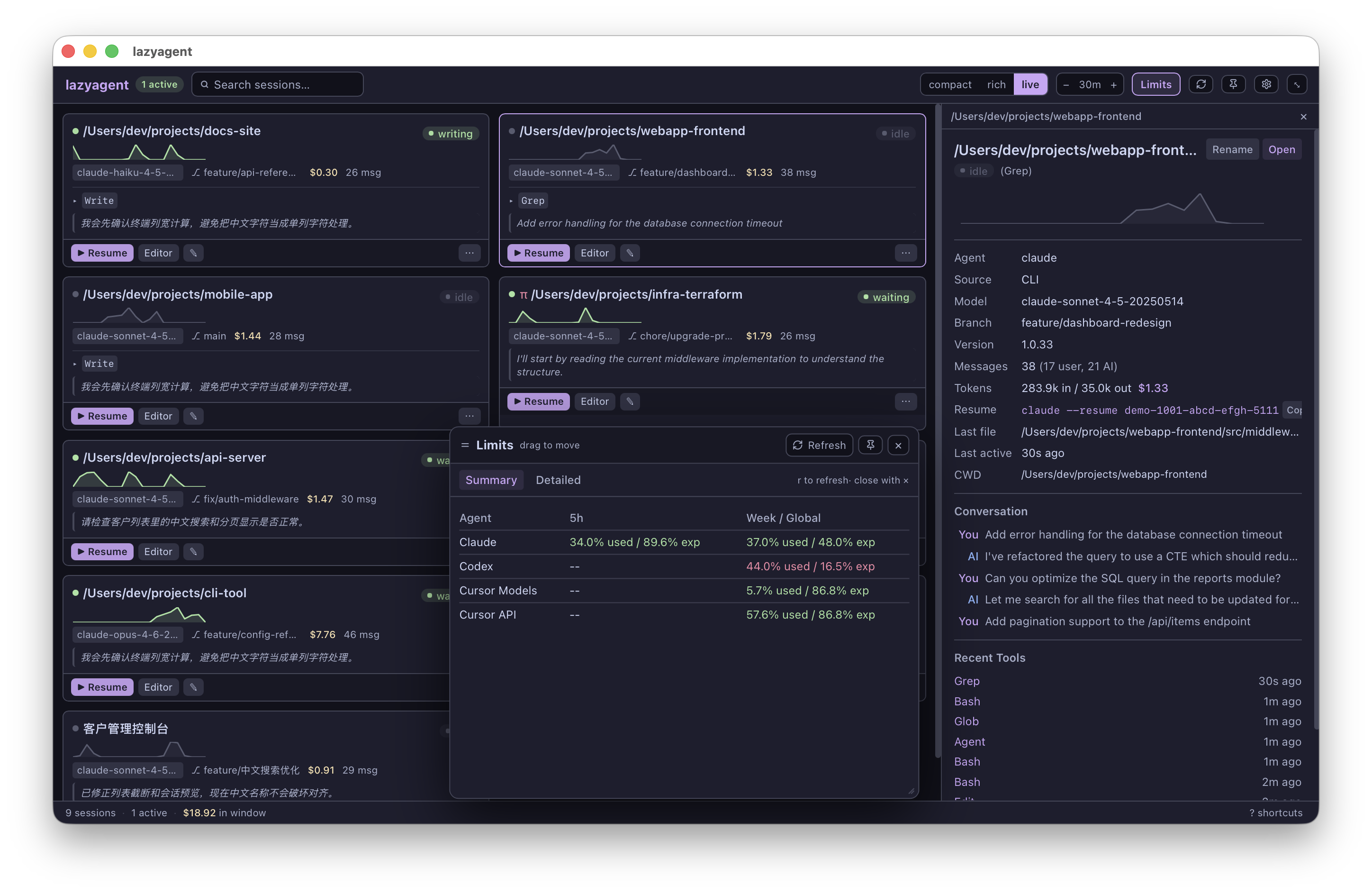
Detaching turns lazyagent into a full desktop app: a Dock icon appears, it shows up in Cmd-Tab, and native macOS menus (App, Edit, View, Window) are installed. The compact popover is replaced by a card-grid dashboard with a proper app toolbar:
- Search is always visible (/ focuses it, esc clears it).
- A density switch — compact, rich, or live (also ⌘1/⌘2/⌘3 from the View menu) — controls how much detail each session card shows; your choice is persisted.
- Toolbar buttons for the time window, Limits, refresh (⌘R), pin always-on-top, Settings (gear), and reattach. Limits open in a centered floating dialog instead of replacing the dashboard. The dialog does not dim or block the dashboard, can be dragged and resized from its lower-right corner, has a position pin that disables dragging, and has its own refresh button. On open and whenever the app window changes size, its dimensions and position are clamped inside the window. Only its close button dismisses it.
Each card carries an action bar: Resume opens the session’s resume command in a new window of your configured terminal, Editor opens the project in your editor, and ✎ renames inline. Right-clicking a card (or the ⋯ button) opens a context menu with the same actions plus Copy resume command and Copy project path. Selecting a card pushes in a detail panel alongside the grid — drag its left edge to resize it (double-click resets), navigate with j/k while it’s open.
The bottom status bar shows session counts and the window’s total cost; ? shortcuts (or the ? key) opens the keyboard-shortcut reference. Press d again or close the window to reattach — the Dock icon goes away and lazyagent returns to menu bar accessory mode.
Settings
The gear icon opens the Settings panel:
- Terminal — which emulator Resume and other terminal actions use: Terminal.app (default) or Kitty for now (more will be enabled as their launch flows are verified). Kitty windows open in a dedicated lazyagent instance group and are raised automatically; no kitty configuration is needed.
- Editor — the GUI editor command for “Open in editor”; empty falls back to
$VISUAL, then$EDITORin a terminal. - Agents — which agents to monitor (applies at the next launch).
- Hide projects containing — path fragments to exclude, one per line (applies immediately).
- API authentication — set, rotate, or clear the HTTP API passphrase and copy the derived bearer token. The current passphrase is never displayed; a running
--apiserver picks changes up at its next restart.
Everything saves to the same config.json the CLI uses — see Configuration.
Keybindings
| Key | Action |
|---|---|
| ↑ / k | Move up |
| ↓ / j | Move down |
| + / - | Adjust time window |
| f | Cycle activity filter |
| / | Search sessions |
| l | Open limits; close them in the attached panel |
| r | Rename session; refresh while the limits view is open |
| d | Detach / reattach panel |
| esc | Close detail / dismiss search |
| ? | Keyboard-shortcut reference (desktop mode) |
| ⌘1–⌘3 | Card density (desktop mode) |
| ⌘L | Open limits (desktop mode) |
| ⌘R | Refresh sessions (desktop mode) |
Right-click menu
Right-click the tray icon for a compact menu:
- Show Panel — open the session panel (same as left-click)
- Refresh Now — force reload all sessions
- Quit — exit the app
Visuals
The GUI uses Catppuccin Mocha as its theme and renders sparklines as real SVG area charts (unlike the TUI’s Unicode braille). Activity badges use the same color taxonomy across all interfaces.
Startup and cache
The initial session list loads progressively: results appear as each agent provider finishes instead of the panel waiting for the slowest provider. Subsequent changes continue to arrive through the normal watcher and polling paths.
The GUI reuses lazyagent’s persistent discovery cache across process runs. This makes later startups faster but also means session metadata and short transcript snippets may be stored in the system cache directory. See Persistent discovery cache for location, permissions, and cleanup behavior.
Combining with other interfaces
lazyagent --gui --api            # macOS app + HTTP API
lazyagent --tui --gui --api      # everything
The GUI always runs in its own OS process (Cocoa requires ownership of the main thread), so combined launches fork it transparently. Quitting via the tray menu kills the tray process only — any TUI or API in the same parent invocation keeps running.